Here's a pretty trivial case I faced; the resolution is interesting:
RewriteEngine on
RewriteLogLevel 3
RewriteLog /path_to_log/rewrite.log
RewriteCond %{REQUEST_URI} /somestring
RewriteRule ^/(.*)$ http://some.server.com/somestring/$1 [R]
If RewriteCond trigger /somestring conflicts with some tomcat JKMount setup (or other trigger like for instance WebLogic), make sure that the mod_rewrite library gets loaded AFTER mod_jk library.
Thursday, January 25, 2007


Monday, November 13, 2006
How to filter out Spam on the Mac?
 I have been using OSX Mail application since years now, I have been activating the Junk filter also since all that time, and, as much as I can recall, I have been happy with it... a long time ago. But these last years, as the spam got really out of hand, I ended up using up most of my email-reading time in email-deleting and email-searching. Piles of junk at the door every morning, every night. Piles and piles. I tried to define additional rules to kind of nail this terrible thing. With no real success. I understand a few reasons why spammers can still spam us: they spoof other people email addresses, they set many random words in the email bodies, and use images as spam contents. All this is very annoying.
Then I discovered, now a few days ago, SpamSieve for the Mac. This plugin takes the same training approach, where you are the one defining the good emails and the spam emails. It then builds a Corpus, which is a list of words, appended at each new email qualification, and associated with a probability for each word to be part of a spam email. Then this probability can be used to move automatically an email to a Spam folder - when greater than 75%. Between 50 and 75% you will have to choose and tell SpamSieve which is which. Everything that comes out with a probaility lower than 50% will remain in your mailbox or go to whichever folder your other Mail rules define.
That's the principle, roughly. What makes SpamSieve appealing to me is:
- its simplicity to operate and make changes in configuration
- its speed of execution
- its apparent efficiency
Tuesday, November 07, 2006
Note taking, information processing
We daily face lots and lots of information. What computers were supposed to manage for us in fact flood back to us perpetually as a virtual boomerang. The information flows non-stop. When at your desk, facing your mail program, news reader, internet browser, you're already filled with information. Stuff for which you need to take rapid decisions. From which you also generate action, like spreadsheets or emails.
We need tools to handle these heaps. So store, sort, make searchable. To create other actions. Just to keep up and still be productive. Be faster, as fast as the flows towards us. I have been looking for a long time for these, which would increase my productivity, and my overall performance in the work field.
Here is what I have found:
We need tools to handle these heaps. So store, sort, make searchable. To create other actions. Just to keep up and still be productive. Be faster, as fast as the flows towards us. I have been looking for a long time for these, which would increase my productivity, and my overall performance in the work field.
Here is what I have found:
- Microsoft OneNote on Windows is quite the best I could find overall. To create 1-click away notes and screen captures it's a great tool. The way you organize everything within that program makes things easy to look back in. Also the way all external documents (emails, files..) can be dropped to create explicit links. Dearly missing on Mac.... Commercial.
- For the Mac I just discovered Yojimbo. Not as good as OneNote but usable, still. More on this later. Shareware.
- QuickSilver on the Mac also. Dearly missing on Windows :-) Allows you to operate many tasks with a few keystrokes. From google searches to running programs or email people or (again) set new events in iCal. Freeware.
- TypeIt4Me on the Mac: set text snippets (essentially used in emails for me, but could be anything else) through predefined key sequences. Takes away the load of repetitive typing. Shareware.
To make OSX look and feel consistent: UNO!
 For those of us who ever "switched", we know that OSX is a great (if not the greatest) and sexiest OS around. There's a little caveat though: for some reasons the design of the interface windows has been taking multiple routes that sometimes make it a bit difficult to the eye. To remediate this problem, interacto.net came up with UNO. This freeware safely changes the look and feel of all applications, into a UNO style, that I personnaly like very much. Try it!
Friday, October 13, 2006
Apache - how to load balance across multiple hosts (using mod_rewrite)
Here is a nice way to load balance requests using Apache and mod_rewrite.
All it takes is a text file with the different targeted servers, and a "load balancer instance" getting the initial requests. This is a nice way to create sticky sessions to different load-balanced back-ends.
RewriteEngine on
RewriteLogLevel 3
RewriteLog /var/opt/logs/rewrite.log
RewriteMap servers rnd:/opt/apache/servers.txt
RewriteRule ^/(.*) https://${servers:mylist}/$1 [R,L]
with servers.txt:
mylist server1.mydomain.com|server2.mydomain.com|server3.mydomain.com
All it takes is a text file with the different targeted servers, and a "load balancer instance" getting the initial requests. This is a nice way to create sticky sessions to different load-balanced back-ends.
RewriteEngine on
RewriteLogLevel 3
RewriteLog /var/opt/logs/rewrite.log
RewriteMap servers rnd:/opt/apache/servers.txt
RewriteRule ^/(.*) https://${servers:mylist}/$1 [R,L]
with servers.txt:
mylist server1.mydomain.com|server2.mydomain.com|server3.mydomain.com
Sunday, August 20, 2006
NewsFire news reader
NewsFire a the best news reader for the mac. I have used both NetNewsWire for mac and the bloglines website, but now that I've tried NewsFire, I must tell that it's for me the easiest and most practical tool to remain on the top of the many news I collect.
Also if you purchase NewsFire this week end, you will get Inquisitor free! Yes, the author will send you a free license.
Also if you purchase NewsFire this week end, you will get Inquisitor free! Yes, the author will send you a free license.
Wednesday, June 21, 2006
How to overwrite a php.ini setup
Often ISP's don't let people change a php.ini setup. Nevertheless, you can programatically change some of the setup.
This can be really useful, for instance to disable the display of some useless warning messages:
ini_set("display_errors","Off");
(... do some stuff here ...)
ini_restore('display_errors');
As you could see here, the error messages were then re-enabled.
This can be really useful, for instance to disable the display of some useless warning messages:
ini_set("display_errors","Off");
(... do some stuff here ...)
ini_restore('display_errors');
As you could see here, the error messages were then re-enabled.
Friday, May 12, 2006
Apache - Reverse Proxy to a backend server running https, warning message
If you ever set some https reverse proxy server to hit a backend through https as well, i.e. set something like (in Apache):
ProxyPass /abc https://abc.somewhere.com
You will likely get some browser warning complaining that the names don't match. To prevent this, simply request your backend SSL certificate with a subject alternative name = your proxy server SSL name, along with your backend common name (here abc.somewhere.com). Then users won't get warnings in their browser.
ProxyPass /abc https://abc.somewhere.com
You will likely get some browser warning complaining that the names don't match. To prevent this, simply request your backend SSL certificate with a subject alternative name = your proxy server SSL name, along with your backend common name (here abc.somewhere.com). Then users won't get warnings in their browser.
Thursday, May 04, 2006
QuickSilver!
I wrote an earlier blog about LaunchBar and Butler, as the most necessary binaries there is on the Mac. I am rarely an early adopter of new tools and usually the first experience is not very positive. You know, we already have it all, right?
Well, I re-discovered QuickSilver a couple of days ago; I was prepared to a little learning curve, and decided to go through a couple of tutorials that night, to help get to the sugar cream layer directly. To sample the great stuff. I did, and I now I LOVE IT!
I love it so much that I simply decided to get rid (i.e. not launch automatically at login anymore) of LaunchBar (had been my sweet sweet friend since years) and my recent adoption (Butler). It's great! It's amazing!! More than anything I had encountered before. Was a paing to work on XP earlier, now it it HELL!
QuickSilver probably is what can be best (or at least close) for human keyboard/screen ergonomy. It emcompasses keyboard shortcuts, spell guesses (not as good as LaunchBar I think, though), contextual menus, notepad interactions (great to have the possibility to type some text on the fly BEFORE picking the program that will use it, whether it's a calculator, a text editor, a browser, a mail program, etc etc). It also offers a shelf, persistent place where you can store all kinds of things (text strips, files, images....) and use them later. Also of course all the buffers are kept (could be hundreds). Also it interfaces very well with iTunes, so any other binary which controls songs and volume were removed. I keep a simple DashBoard widget to keep the album covers visible, and rate the tunes on the fly. Also QS allows to browse and play the tunes.
Many plugins are already available, making this free engine a marvel. I'll likely get back on this at later time. Without programming you can still create your own tools (macros?) to add functions and help in common tasks.
Apple and the world of developers who adhered to this platform, makes the rest of them (the computers) gray, conform, boring, difficult. Elegance and simplicity, again.
Well, I re-discovered QuickSilver a couple of days ago; I was prepared to a little learning curve, and decided to go through a couple of tutorials that night, to help get to the sugar cream layer directly. To sample the great stuff. I did, and I now I LOVE IT!
I love it so much that I simply decided to get rid (i.e. not launch automatically at login anymore) of LaunchBar (had been my sweet sweet friend since years) and my recent adoption (Butler). It's great! It's amazing!! More than anything I had encountered before. Was a paing to work on XP earlier, now it it HELL!
QuickSilver probably is what can be best (or at least close) for human keyboard/screen ergonomy. It emcompasses keyboard shortcuts, spell guesses (not as good as LaunchBar I think, though), contextual menus, notepad interactions (great to have the possibility to type some text on the fly BEFORE picking the program that will use it, whether it's a calculator, a text editor, a browser, a mail program, etc etc). It also offers a shelf, persistent place where you can store all kinds of things (text strips, files, images....) and use them later. Also of course all the buffers are kept (could be hundreds). Also it interfaces very well with iTunes, so any other binary which controls songs and volume were removed. I keep a simple DashBoard widget to keep the album covers visible, and rate the tunes on the fly. Also QS allows to browse and play the tunes.
Many plugins are already available, making this free engine a marvel. I'll likely get back on this at later time. Without programming you can still create your own tools (macros?) to add functions and help in common tasks.
Apple and the world of developers who adhered to this platform, makes the rest of them (the computers) gray, conform, boring, difficult. Elegance and simplicity, again.
Playing tunes wirelessly all around the house?
YES! Incidently I discovered that iTunes can now play on my Airport at the same time as it blows from my G5!!! I can buy a couple of more Airports later on, hook them up with speakers, and PARTY!!!! Music everywhere! Hiya!!!
Reference here
Reference here
Thursday, April 13, 2006
Butler on Mac OSX
At first I didn't really look into it. After all, having the excellent LaunchBar and SpotLight tools handy was making me really happy already. Butler seemed like just another goodie in my menu bar, one among the multitude of tools that try to complement each other, without really making your life that easy at all.
Then I started playing with Butler. First of all, yes, it's a great interface to configure, with a good help section too. The kind of quality we love, and it's even free...
So I played with it, making most of my setups (directories, applications, web bookmarks, even keystrokes macros for my Mail application) invisible from the Finder interface. And I defined some shortcuts to activate all these. Plus shortcuts to rate iTunes songs!
It worked so far very nicely! Sometimes I noticed some delay in the initial caching of Butler, but this will be likely tuned later. Butler is becoming my favorite tool to gain speed in my work. Does what an expensive QuickKeys does. Probably not the most sophisticated of its category but it's really, really great!
Then I started playing with Butler. First of all, yes, it's a great interface to configure, with a good help section too. The kind of quality we love, and it's even free...
So I played with it, making most of my setups (directories, applications, web bookmarks, even keystrokes macros for my Mail application) invisible from the Finder interface. And I defined some shortcuts to activate all these. Plus shortcuts to rate iTunes songs!
It worked so far very nicely! Sometimes I noticed some delay in the initial caching of Butler, but this will be likely tuned later. Butler is becoming my favorite tool to gain speed in my work. Does what an expensive QuickKeys does. Probably not the most sophisticated of its category but it's really, really great!
Apache 2.x Weblogic on HPUX
Sometimes, when Apache proxies to a WebLogic server, if the application has an issue and fails in releasing threads (typically you would see in the logs some threads struck and some "Out of Memory" errors), it can have a direct effect on Apache itself. Some child process will top CPU till restarted. Restarting Apache can solve the issue, WebLogic releasing its threads and becoming healthy again.
A fine tuning of Apache and the way the processes and threads are configured is also necessary:
- Apache KeepAlive On (to minimize the number of connections for the same client)
- Apache MaxClients and ThreatdPerChild (one thread = 1 connection)
- TCP parameter tcp_conn_request_max must be set
- TCP parameter tcp_keep_alive_interval (not to have too many sockets in TIME_WAIT state)
- WebLogic managed servers can be allocated some threads with increment (example: start with 25, increment by 5 till 50)
But again the root cause may likely be the WebLogic application itself. So looking into the WebLogic logs is necessary to get the whole picture.
A fine tuning of Apache and the way the processes and threads are configured is also necessary:
- Apache KeepAlive On (to minimize the number of connections for the same client)
- Apache MaxClients and ThreatdPerChild (one thread = 1 connection)
- TCP parameter tcp_conn_request_max must be set
- TCP parameter tcp_keep_alive_interval (not to have too many sockets in TIME_WAIT state)
- WebLogic managed servers can be allocated some threads with increment (example: start with 25, increment by 5 till 50)
But again the root cause may likely be the WebLogic application itself. So looking into the WebLogic logs is necessary to get the whole picture.
Monday, February 27, 2006
Voice recognition and dictation
I have started to use some recognition software on my Mac. In the hope to make the mac get dictation: emails, proposals, you name it. It's a little difficult to train the software to learn and recognize my speech. And the program is a bit buggy, it stopped responding a couple of time. Also it forces you to use SpeakPad (a little notepad) to do your dictations, before copying them in other programs. But these are still details if the software works. And in fact it does. I believe that perseverance will make the difference. My choice went for IBM Viavoice software, which was not too expensive. I do hope that it will allow me to SAVE TIME, altogether. If it doesn't there won't be any real use. Time will tell.
Python and MySQL on MacOS X "Tiger"
Started developing in Python/MySQL on MacOS X "Tiger". From a web developer perspective it's a great change from PHP. Many Python features (besides its very clear formatting) are really appealing. Planning to start with some litle web development, then (hopefully, as time allows me) move towards some more serious business. MacPython (http://wiki.python.org/moin/MacPython) helped me greatly to deploy the necessary packages. And I could use the MySQLdb package very easliy. More to come on this.
Wednesday, January 11, 2006
How to play a random tune in MacOSX?
Here is a little script to play a random tune in MACOSX. I have enjoyed it since years.
Set this script as an executable, and run it interactively (you will need to put a .command extension to run it from the Finder). I use it as an alarm for the morning. How cool is that.
You will need to configure ONLY the path to the directory where all your music files reside. I use Korn Shell (ksh) as a personal preference but this script should work w/o or w/ very slight alterations. Why do I use QuickTime at the end instead of iTunes? Because I wanted to play ONE file only.
To run it from the terminal window type: ./playRandom.command
Your comments are welcome. We can come up with a more sophisticated version.
Set this script as an executable, and run it interactively (you will need to put a .command extension to run it from the Finder). I use it as an alarm for the morning. How cool is that.
You will need to configure ONLY the path to the directory where all your music files reside. I use Korn Shell (ksh) as a personal preference but this script should work w/o or w/ very slight alterations. Why do I use QuickTime at the end instead of iTunes? Because I wanted to play ONE file only.
To run it from the terminal window type: ./playRandom.command
Your comments are welcome. We can come up with a more sophisticated version.
#!/bin/ksh
# enter here the path to your music directory:
f='/Volumes/yourDisk/yourMusicDirectory'

# temp file:
l='/tmp/musicList.tmp'
if [[ ! -e $f ]]; then
echo Sorry, $f is not accessible.
exit 1
fi

r=$RANDOM
find $f -name *.mp3 > $l # list of mp3 from f root folder
t=`wc -l $l |awk '{print $1}'` # how many titles?
if [[ $t -eq 0 ]]; then
echo Sorry, no title found.
exit 0
fi

echo "Random = $r , nb titles = $t"
# takes modulo:
# remainer of division of random number by number of mp3 files
n=`bc << eof
($r % $t)+ 1
eof
`
echo "number is $n"
c="sed -n '${n},${n}p' $l"
# gets this line number modulo to play
title=`/bin/ksh -c "$c"`
echo "+++++ Playing $title +++++"
open -a "QuickTime Player.app" "$title" &
rm $l
How to push your best pictures online using iPhoto and Flickr in less than 15 minutes
So there you are, the cab just dropped you at the house and you're already connecting your digital camera to your computer to get a quick additional shot at these amazing memories. Of course you want to share them on the fly, too!
Preparation:
Now here is what you just need to do:
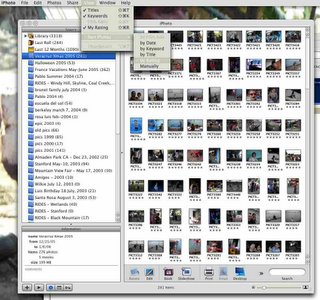
Just bear in mind that the upload to Flickr is limited to 20Mb/mo in the free version. Pro version is a must once you're addicted.
Have fun, and share!
Preparation:
- get a free account at flickr.com
- get the little flickr plugin for iPhoto - I use FlickrExport by Connected Flow, free and working great
- load your pictures in iPhoto
Now here is what you just need to do:
- rotate the pictures
- rate the pictures, give some 3 and 4 stars to the best ones
- sort your album by rating, highest rate first.
- select the highest rated pictures, export them to flickr, voila!
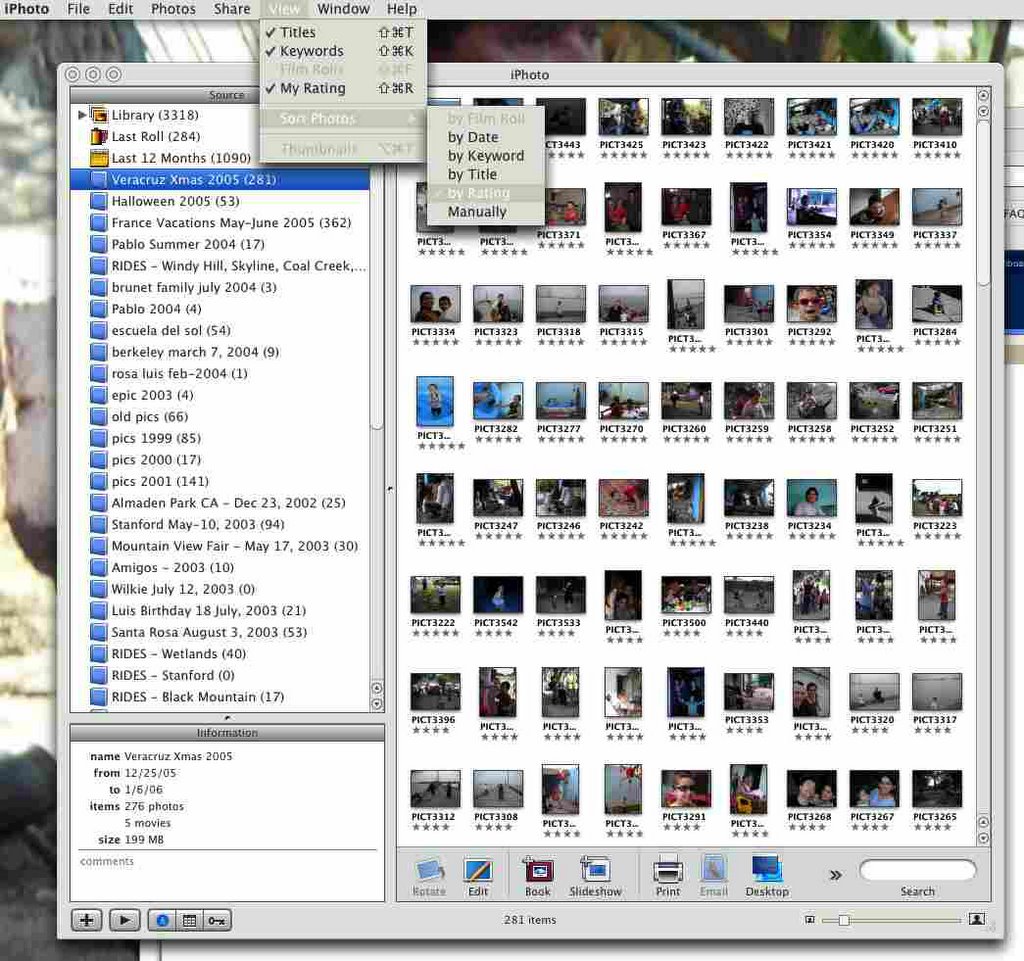
Just bear in mind that the upload to Flickr is limited to 20Mb/mo in the free version. Pro version is a must once you're addicted.
Have fun, and share!
Thursday, December 22, 2005
MACOSX Apache 2.0.52 update
I had gone back and forth between Apache 1.3.28 and 2.0 installations, staying stuck since too long with 1.3 version. Mainly because I use this webserver for business and it needs to remain available if I don't want to have business hickups. Although I have been installing and configuring so many instances of Apache web servers in the past (mostly on HP-UX and Linux) I am still intimidated when it comes to macs. Also I had tried multiple MacOSX Apache 2/MySQL/PHP bundles, and that didn't work for me, since that somehow conflicted with existing components. In fact as soon as we're back in the 100% GUI-driven syndrome, I don't get it. Wander in the internals.
Tonight I thought I should try it again. And I did. First I got Apache 2.0.52 package right from Apple website. I decided to deploy only what I needed to really upgrade, which would be Apache and PHP. Once well deployed and tested on separate port, I needed to have a couple of little things to set:
- PHP 5 load module - with a shiver about my existing code, developed in PHP 4. Same great Liyanage stuff, that guy's been around since a long time and still delivers great stuff. Little tweaks needed, but not that much.
- Name Virtual Hosts (see my other post on that)
- protected directories in my sites
- startup script (/Library/StartupItems)
- webserver user/group and privileges, session cache files permissions
- logs locations were changed
- Apache2 System Preference, which is quite nice to use (although I am a shell user by necessity)
I had absolutly no issue with the MySQL database connectivity, which is totally external to the Apache/PHP combo.
This upgrade was the oportunity to move from an old configuration file to a new one, since Apache 2 has its own specifics. There ares still litte details I didn't test yet, like some wap wml modules for cell phones, and my overal PHP 4 code.... Good thing is, the response is excellent; at least as good as my old Apache server.
I could have done it quicker, I guess. Overall it was completed in around two hours.
Tonight I thought I should try it again. And I did. First I got Apache 2.0.52 package right from Apple website. I decided to deploy only what I needed to really upgrade, which would be Apache and PHP. Once well deployed and tested on separate port, I needed to have a couple of little things to set:
- PHP 5 load module - with a shiver about my existing code, developed in PHP 4. Same great Liyanage stuff, that guy's been around since a long time and still delivers great stuff. Little tweaks needed, but not that much.
- Name Virtual Hosts (see my other post on that)
- protected directories in my sites
- startup script (/Library/StartupItems)
- webserver user/group and privileges, session cache files permissions
- logs locations were changed
- Apache2 System Preference, which is quite nice to use (although I am a shell user by necessity)
I had absolutly no issue with the MySQL database connectivity, which is totally external to the Apache/PHP combo.
This upgrade was the oportunity to move from an old configuration file to a new one, since Apache 2 has its own specifics. There ares still litte details I didn't test yet, like some wap wml modules for cell phones, and my overal PHP 4 code.... Good thing is, the response is excellent; at least as good as my old Apache server.
I could have done it quicker, I guess. Overall it was completed in around two hours.
Dynamic IP address & multiple websites with Apache

port forwarding
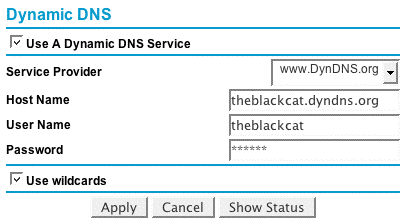
dyndns.org IP sending
Of course many of us know already dyndns.org website, which has been offering since years the possibility to get a domain name for free. For instance my private domain is theblackcat.dyndns.org. Since I don't have a static IP address at home, but the dynamic IP address provided by my dear ISP, I use dyndns.org. All I do is send to dyndns.org my IP address, on a regular basis. Uh in fact I used to, but since my router can do the job in my back, I let it handle it. I also tell it to handle wildcards so any subdomain will also be routed to me. More about that feature later...
I have Apache running on my G5. Nothing fancy, I tell my router to reroute all trafic coming on port 80, to my G5. So basically at this point I have a webserver behind a router, getting requests on port 80 for the default host, through a NAT router. Please note that in order to make sure that the port forwarding rule always works you will need to tell the router to associate the internal IP address 192.168.0.2 (in my example) to your web server's physical MAC address. If you don't do that and restart all your network, the NAT router will have all the bandwidth to address local addresses randomly, kinda first come first serverd. You don't want that. You need to harden the IP address of your web server, for the web services. If you have other components running on some other machines (say, a VNC service you need to access remotely) same rule, you'll need to give that other server a local IP address that doesn't change.
What happens when you hit: http://theblackcat.dyndns.org ? Dyndns.org name server tells your ISP where to route theblackcat.dyndns.org requests, and the router sends the requests on port 80 to that webserver behind it. Now, what if I don't have only this main family website, but also a myriad of other little web sites, on that machine?
Let's say I have customer XYZ to set up and test on my home server before putting the application on his/her ISP. My router will get these, I know that from a simple nslookup:
$ nslookup xyz.theblackcat.dyndns.org
Non-authoritative answer:
xyz.theblackcat.dyndns.org canonical name = theblackcat.dyndns.org.
Name: theblackcat.dyndns.org
Address: aa.bb.cc.dd
So it will work, the requests will be routed to my dynamic address and come to my computer. I will need to set a xyz.theblackcat.dyndns.org as a name virtual host in apache.
I will need to:
1) Activate the name virtual host in Apache:
NameVirtualHost 192.168.0.2
2) set this new virtual host by name
ServerName xyz.theblackcat.dyndns.org
DocumentRoot /path/to/xyz/document/root
3) Restart Apache web server. Voila! Http://xyz.theblackcat.dyndns.org requests will go through the internet to my router (dyndns.org IP address resolution), from the router to the computer (static route + port forwarding), and from the computer to the right subdomain document root (apache listener and name virtual host).
You can have many Name Virtual Hosts listening to the same IP address (my G5 IP address) and Port (80) and still it will work! In the past I used to route customers to different ports (ex: http://theblackcat.dyndns.org:789), but this way is much more secure and cleaner.
You could carry your laptop over the world, with all these nice websites sleeping inside, and still have your dyndns.org name following you. Still be online. You might need to add some little dyndns.org client to send the new IP addresses in the case you're not behind a nice NAT router which performs it for you, to have your IP Address sent. Either way, easy and reliable. Be aware that if your laptop is off, unplugged, people will get nasty looking TCP errors. You might want to use a cheap provider an set a little dynamic page to test your web server and tell user "Sorry - please come back soon!" -- That's easy, another story I'll tell you another day...
14 MacOSX essential applications
Of course when it comes to macs and great applications, I can't omit what Apple is giving us for free ( iTunes iPhoto iMovie iDVD Safari Mail)... There are also the sedentary 800 pounds gorrillas that I use all the time in my business and leisure, from Adobe (photoshop, illustrator, acrobat) and from Microsoft (Excel, Word, Powerpoint)...
Besides, here are the applications that I use, mainly from shareware or freeware origin. There are equivalent products out there, but at some point I decided to stick to these:
Besides, here are the applications that I use, mainly from shareware or freeware origin. There are equivalent products out there, but at some point I decided to stick to these:
- GraphicConverter: helped me hundreds of times in the past 10 years. It's still a reference in the Mac world
- Proteus (instant messenger on steroids, setting )
- iPulse: nice looking monitor for my G5, my favorite skin being "The Eye"
- Acquisition: cool peer to peer software, non invasive
- Launchbar: I know Tiger now has it. Launchbar must have saved me hundreds of hours
- Synchronize!Pro: I love this backup program
- Firefox: I use it a bit more than Safari. I merely use IE at all
- TextWrangler: best text editor for free. Little brother of BBedit
- HandBrake: to rip your DVDs
- MacJanitor: to cleanup your mac of the mess left behind; a healthy habit
- VLC: to play all kinds of movies files formats
- Transmit: to cover all my FTP needs. I never editi usually in a ftp utility. But with this one, when it comes to quick fixes or short release cycles, it's really great. Allows you to edit with your favorite text editor. Plenty of power tools (like synchronization) that I 'd rather NOT use :)
- FinderPop: sounds familiar? great Finder utility to map volumes from any place. Now ported on MacOSX. It's like meeting an old friend.
- DiskWarrior: I was about to forget this last one, although it's one of the best utilities to salvage disks and corrupted files structures. Succeeded where all others failed. A must!
What's in my MACOSX menu bar?

I have always been a fan of apple menus. In order of appearance we have (left from right):
- BackLight: an amazing desktop utility that allows us to play any ScreenSaver we have (like the great SaveHollywood which allows you to play movies as screen savers) - associating BackLight and SaveHollywood plays movies as desktop backgrounds. Added to that you can of course choose the opacity of the effects. Sweet!
- ByteController: very sweet iTunes controller. In fact the thing is, I merely use the menu bar options, mais I LOVE the keyboard shortcuts that allow me to control iTunes pause (cmd-alt-space), skip (cmd-right, cmd-left) and volume (cmd-up cmd-down arrows) buttons, while keeping on typing other things
- SpiritedAway: allowing me to hide idle application automatically and define exceptions
- Yahoo! Widget Engine: allowing me to have all my Yahoo! data (calendar, notes, address book...) directly on my desktop, keeping my data always up to date.
- GeekTool: listing on my desktop sets of logs when need be (nice to monitor a webserver, among other things)
- Stuffit icon (useful)
- Displays control panel (useful)
- Sound controller (useful)
- Applescript icon: to access library scripts quickly (merely used)
- Users menu: for quick switch
- MenuCalendarClock: great little utility; I use personnaly the freeware version which is realy enough for my usage
Subscribe to:
Posts (Atom)
